The Cyber Resilience Architecture Behind Serving Public Facing Content from Azure Storage
[azure, storage, architecture, cloud security]
A marketing team needs to serve product images, videos, and customer success stories to a global audience or maybe any public facing content. Traffic is growing fast, latency matters, and the content itself isn’t secret — it’s meant to be public. So why does this scenario still trip up so many teams?
Because “public” gets misread as “no security needed.” It isn’t. This post walks through the architecture that real teams put in front of public content in Azure — the same pattern taught hands-on in SecureCloudX Module 3, Lab 02 — and is honest about the one gap in it that a lot of write-ups gloss over.
The scenario
- Product images, videos, and marketing content for a public website
- Customers are worldwide and growing — latency matters
- Content is mission-critical: it needs to load fast and recover fast if something is deleted or overwritten
- Nothing here is confidential — it’s meant to be public
If you’ve ever been asked to “just put some files somewhere the website can read them,” this is that request, at enterprise scale.
The naive approach (and why it’s wrong)
The fastest way to satisfy this requirement is: create a storage account, create a container, flip “Public access level” to Blob (anonymous read), and hand out the blob.core.windows.net URL. It works on day one. It’s also how most public data exposure incidents start:
- The direct blob URL is now the only thing standing between the internet and your storage account
- There’s no caching, so every hit — legitimate or a scraping bot — goes straight to your origin
- There’s no DDoS layer between the internet and your storage account
- Anonymous reads generate no sign-in audit trail — you can’t tell who’s reading what
- If a developer later reuses that same account for anything less public, one misclick on “change access level” exposes it too
None of this shows up in a demo. All of it shows up in an incident report.
The architecture that actually holds up
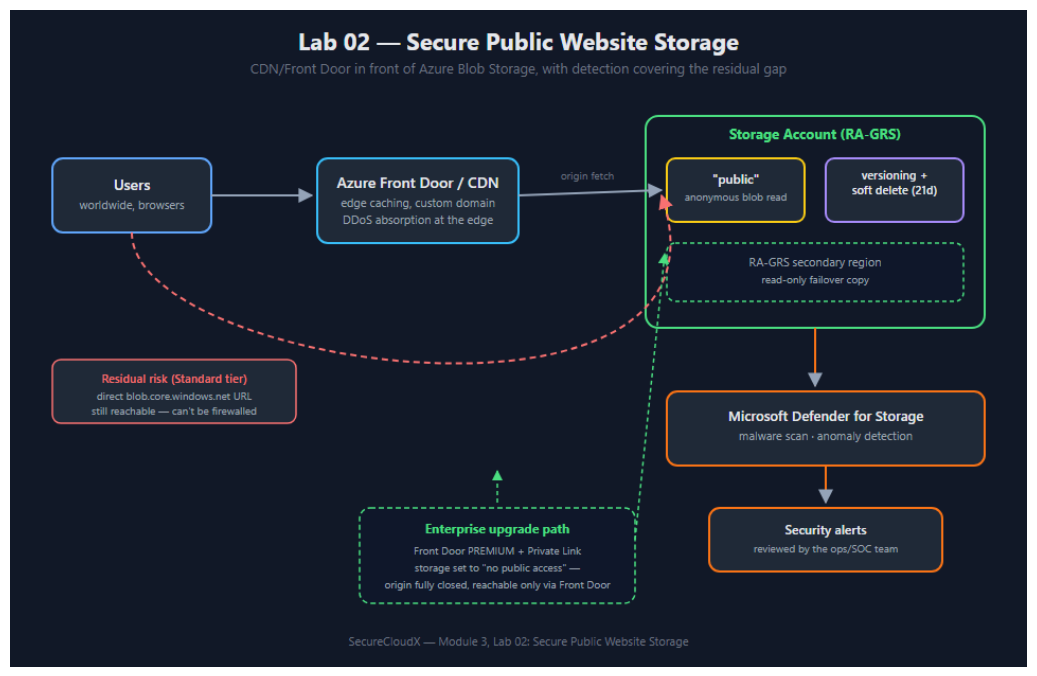
Reading it left to right:
- Users hit Azure Front Door or Azure CDN first, never the storage account directly. The edge caches content close to the user (solving the latency requirement), absorbs traffic spikes and basic DDoS at the edge, and gives you a custom domain and certificate management point that’s decoupled from the storage account itself.
- The storage account is configured for the failure modes that actually matter for public content:
RA-GRSfor regional redundancy, soft delete (21-day retention) so an accidental or malicious delete is recoverable, and blob versioning so an overwrite doesn’t destroy the previous copy. All three of these map directly onto “recover fast if something is deleted or overwritten” from the scenario. - Anonymous read access is scoped to exactly one container (
public), not the account. A private container living in the same account stays private regardless of what happens to the public one. - Microsoft Defender for Storage watches the account for malware uploads and anomalous access patterns — this is the detective control, and it matters more here than in most architectures, for reasons in the next section.
The gap most write-ups don’t mention
Here’s the honest part: a Standard-tier CDN or Front Door does not hide the storage origin. Azure Storage’s firewall “resource instance” exception list is a fixed set of specific PaaS services (Cognitive Search, Data Factory, Synapse, and a handful of others) — CDN and Front Door aren’t on it, and there’s no IP-range or service-tag trick that reliably substitutes for it either. If someone finds your storage account’s blob.core.windows.net hostname, they can still hit it directly, cache or no cache.
For public marketing content, that’s usually an acceptable trade-off — the content is public anyway, so a direct hit isn’t a confidentiality breach. What it does still risk is unmetered origin load and unattributed access, which is exactly why Defender for Storage sits in the architecture as a compensating control: it can’t stop the direct request, but it flags the malware upload or the scraping pattern that a network control can’t catch here.
If the requirement changes — even slightly, e.g. “this needs to be provably unreachable except through our CDN” — there’s exactly one architecture that satisfies it at Standard-tier-adjacent cost: Azure Front Door Premium + Private Link to the storage account, with public network access disabled entirely. That’s a real SKU upgrade, not a checkbox, so it’s worth confirming the requirement is real before you pay for it.
Decision table: which one do you actually need?
| Requirement | Architecture | Extra cost vs. baseline |
|---|---|---|
| Fast global delivery of public content | Front Door/CDN Standard + Storage (RA-GRS) | Low — this is the baseline pattern above |
| Recover from accidental delete/overwrite | + Soft delete (21d) + Versioning | Storage cost of retained versions only |
| Detect malware uploads / anomalous access | + Microsoft Defender for Storage | Per-transaction/GB — not free tier |
| Origin must be provably unreachable directly | Front Door Premium + Private Link, storage public access disabled | Meaningfully higher — Premium SKU + Private Link |
Most public-content scenarios stop at row 3. Row 4 is for when “public” content still needs a private origin — think a partner-only staging environment served through the same CDN, or a compliance requirement that mandates no public IP exposure on the storage layer regardless of what’s in it.
Why this matters beyond the lab
This isn’t an academic pattern — it’s the same shape you’ll find behind CDN-fronted static sites at any company serving global content: edge cache for performance, storage-layer resilience for recoverability, scoped anonymous access for blast-radius control, and detection for the gap the network layer can’t close. If you’re the engineer asked to “put some files somewhere the website can read them,” this is the version of that answer that survives a security review.
Try it hands-on in Module 3, Lab 02: Secure Public Website Storage it walks through provisioning every piece of this diagram, including the CDN/Front Door step and the Defender for Storage step, step by step.
TLDR
- Don’t just flip “public access” on a storage account that is public facing — it leaves you exposed.
- Put a CDN or Front Door in front of it for caching, DDoS absorption, and custom domain/cert management.
- Configure the storage account for recoverability (RA-GRS, soft delete, versioning).
- Scope anonymous access to a single container, not the whole account.
- Use Microsoft Defender for Storage to detect malware uploads and anomalous access patterns like data exfiltration.
- Consider Private Link and disabling public access if the origin must be provably unreachable.
Happy hacking!